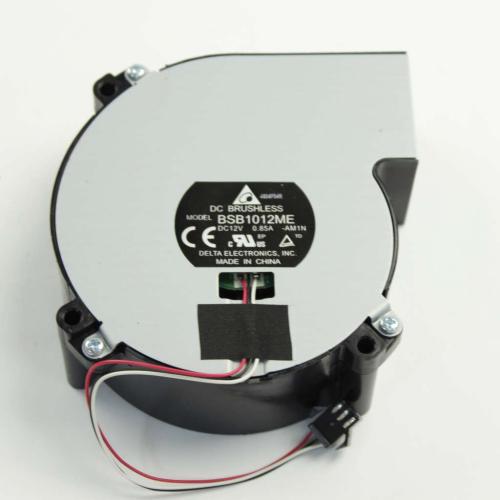
Sony Projector DC Fan (VPL-HW30ES) - 1-855-126-12
Sony
Part Number : 1-855-126-12
The Sony Projector DC Fan (VPL-HW30ES) - 1-855-126-12 is a genuine OEM replacement part designed to ensure proper cooling for your projector. This fan plays a critical role in maintaining optimal operating t...
Does this part fit my model?
Find if this part fits your appliance
Does this part fit my model?
No, This Part Does Not Fits in This Model
The Sony Projector DC Fan (VPL-HW30ES) - 1-855-126-12 is a genuine OEM replacement part designed to ensure proper cooling for your projector. This fan plays a critical role in maintaining optimal operating temperatures, preventing overheating during use.
A malfunctioning or damaged fan can lead to overheating issues, which may cause the projector to shut down unexpectedly or reduce its lifespan. This can significantly impact your viewing experience and the projector's overall performance.
This replacement DC fan is intended to replace the original component and is typically located inside the projector housing. By installing this part, you can ensure efficient airflow and cooling, enhancing the projector's reliability during extended use.
Common Problems This Sony Projector DC Fan (VPL-HW30ES) - 1-855-126-12 Helps Fix:
- Overheating of the projector causing shutdowns.
- Increased noise levels due to a failing fan.
- Inconsistent performance and picture quality.
- Longer startup times as the projector struggles to cool down.
- Frequent error messages related to overheating.
- Physical damage or obstruction in the fan affecting airflow.
DIY Installation – Sony Projector DC Fan (VPL-HW30ES) - 1-855-126-12
-
Safety:
Ensure the projector is unplugged from the power source to avoid electrical hazards during installation.
-
Remove the Existing Part:
Open the projector housing and carefully disconnect the old fan from its mounting position and electrical connectors.
-
Install the Replacement:
Position the new Sony Projector DC Fan in the appropriate location, securing it with screws and reconnecting the electrical connectors.
-
Test the Installation:
Reassemble the projector, plug it back in, and check for correct fan operation and cooling efficiency.
Why Order From Us?
Your satisfaction matters to us. Here’s why you should choose us for your replacement parts:
- Genuine OEM replacement parts from Sony, ensuring quality and compatibility.
- Fast and secure shipping.
- Hassle-free returns within 30 days of purchase.
- Free replacement for defective or damaged items, according to the seller's stated policy.
- Dedicated customer support for assistance with the purchase and return process.