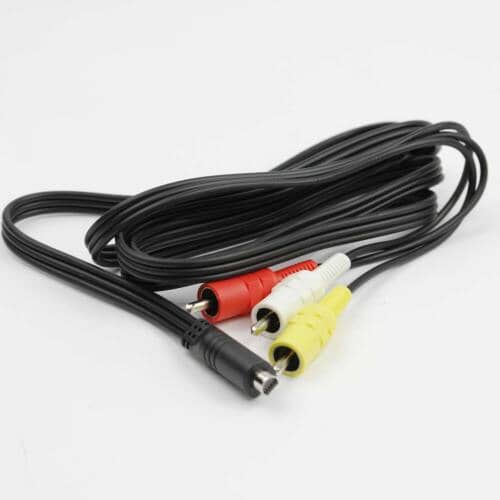
Sony Camcorder AV Multi Cord with Connector - 1-838-205-11
Sony
Part Number : 1-838-205-11
The Sony Camcorder AV Multi Cord with Connector - 1-838-205-11 is an essential OEM replacement part for your Sony camcorder. This multi cord is designed to transmit audio and video signals, ensuring high-q...
Does this part fit my model?
Find if this part fits your appliance
Does this part fit my model?
No, This Part Does Not Fits in This Model
The Sony Camcorder AV Multi Cord with Connector - 1-838-205-11 is an essential OEM replacement part for your Sony camcorder. This multi cord is designed to transmit audio and video signals, ensuring high-quality playback and recording.
Using a damaged or defective AV multi cord can result in poor audio quality, video distortion, or complete loss of signal when connecting to other devices. This can hinder your ability to enjoy or share your recordings effectively.
This replacement cable is designed to replace your existing AV multi cord. Proper installation will restore your camcorder’s functionality, allowing for seamless connections to TVs, monitors, or other audio-visual equipment. It is generally located at the camcorder's output port.
Common Problems This Sony Camcorder AV Multi Cord with Connector - 1-838-205-11 Helps Fix:
- Intermittent audio dropouts during playback.
- Video distortion or poor image quality on connected displays.
- Failure to connect or recognize external devices.
- Physical damage to the cord, such as fraying or breaks.
- Inconsistent signal transmission affecting recording quality.
- Loss of sound during video playback.
DIY Installation – Sony Camcorder AV Multi Cord with Connector - 1-838-205-11
-
Safety:
Ensure the camcorder is powered off and disconnected from any power source to prevent electrical hazards during installation.
-
Remove the Existing Part:
Unplug the damaged AV multi cord from the camcorder and any connected devices. Inspect the connections for wear or damage.
-
Install the Replacement:
Connect the new AV multi cord to the camcorder's output port, ensuring a secure fit. Connect the other end to the desired audio-visual device.
-
Test the Installation:
Power on the camcorder and the connected devices. Check audio and video playback to ensure proper functionality.
Why Order From Us?
Enjoy reliable service with our dedicated support team.
- Genuine OEM replacement parts from Sony.
- Fast and secure shipping.
- Hassle-free returns within 30 days of purchase.
- Free replacement for defective or damaged items, according to the seller's stated policy.
- Dedicated customer support for assistance with the purchase and return process.